

How a simple “I found your photo” message can quietly take over your account
How a simple “I found your photo” message can quietly take over your account
A new WhatsApp scam is spreading that doesn’t look like hacking at all. There’s no password theft. No SIM swap. No obvious warning signs.
Instead, people are being tricked into giving attackers access themselves, simply by following what looks like a normal verification step.
Security researchers call this a GhostPairing attack. Here’s how it works, why it’s dangerous, and what you can do to stay safe.
It starts with a message from someone you trust
The scam usually begins with a short, casual message from someone you know on WhatsApp. It often looks like this:
“Hey, I just found your photo!”

Lure message received by the victim
There’s nothing obviously suspicious. No strange phone number. No long explanation. Just a familiar contact and a link.
When you tap the link, it opens a page that looks like Facebook. Same colors. Same logo. Same general layout. The page tells you that you need to “verify” before you can view the photo.
Many people click through without thinking twice.
That’s the trap.
The fake Facebook page isn’t about Facebook at all
The page you see is not connected to Facebook. It’s a look-alike site designed to feel familiar and safe.
Its real purpose is something very different.
Instead of stealing your Facebook login, the page secretly walks you through WhatsApp’s own device-linking process, the same feature people use to connect WhatsApp Web or a desktop computer.
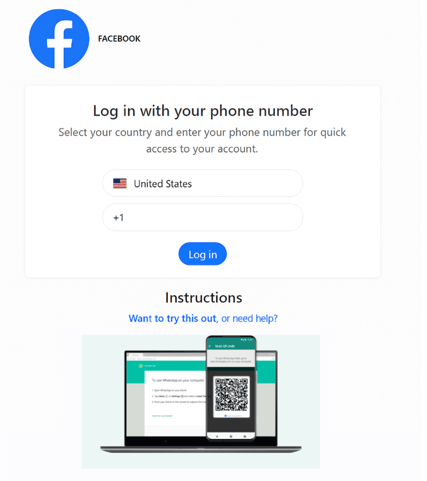
Fake Facebook page showed after clicking on the WhatsApp received link
By the end of the process, the attacker’s device is quietly added as a linked device on your WhatsApp account.
From WhatsApp’s perspective, everything looks legitimate. You approved it.
How attackers get into your WhatsApp without a password
WhatsApp allows users to link new devices in two main ways:
This scam mainly uses the numeric code option, because it works entirely on one phone and feels like a normal security step.
Here’s what happens behind the scenes:
No passwords are stolen. No security systems are broken. You’ve unknowingly invited them in.
What scammers can see and do once they’re inside
Once an attacker links their device, they get almost the same access you would on WhatsApp Web:
The scariest part is that your phone keeps working normally.
Many victims have no idea another device is connected in the background. The attacker can sit quietly, reading conversations and watching how people talk, for days or weeks.
How the scam spreads so fast
After taking over one account, attackers use it to message that person’s contacts.
Family groups. Work chats. Sports teams. Friends.
Because the message comes from someone people know, it feels safe. Some people click. Some don’t. Those who do become the next victims.
This creates a snowball effect, allowing the scam to spread quickly without cold spam or random messages.
Why this scam is especially concerning
This attack stands out for a few reasons:
In other words, it’s quiet, persistent, and easy to miss.
And once attackers have access to conversations, they can use that information for more targeted scams, impersonation, or even extortion later on.
How to protect yourself right now
The good news is that protecting yourself against WhatsApp scams is straightforward.
A bigger lesson beyond WhatsApp
This attack isn’t just about one app.
Many services today rely on QR codes, approval prompts, or “enter this code on your phone” flows to link devices quickly. When those steps are too easy and too invisible, they can be abused.
GhostPairing is a reminder that convenience can become a vulnerability if users aren’t clearly warned what they’re approving.
The bottom line
This WhatsApp scam doesn’t break encryption or steal passwords. It does something simpler and more effective.
It convinces people to approve access themselves.
By hiding behind familiar designs and normal-looking verification steps, attackers can quietly create a “ghost device” that lives inside your account.
A few small habits, checking linked devices, questioning unexpected verification requests, and sharing awareness, go a long way toward shutting this down.
Staying safe doesn’t require technical expertise. It just requires knowing what to watch for. To read the original research, visit our Gen blog.

1988 - 2026 Copyright © Avast Software s.r.o. | Sitemap Privacy policy